
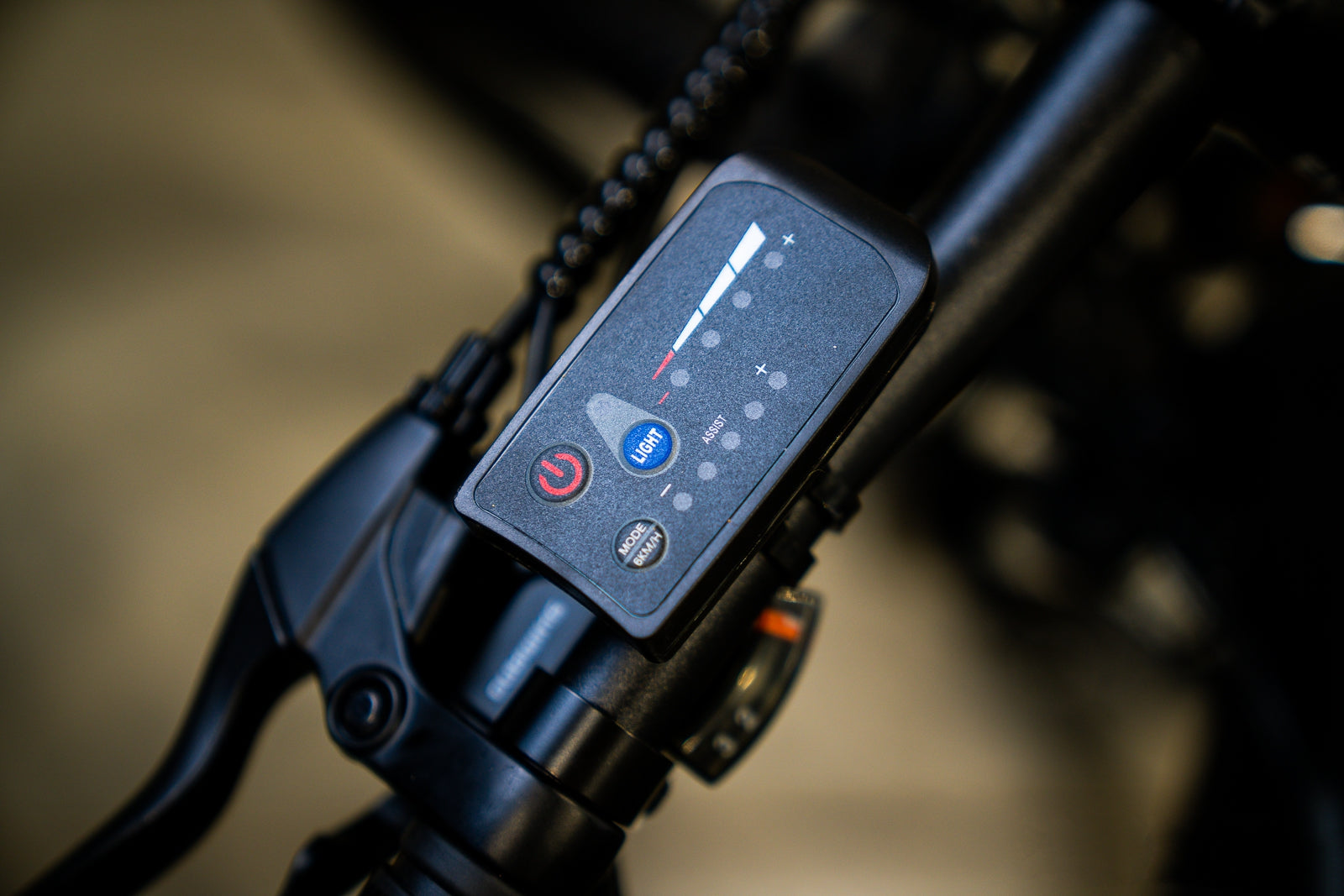
Our electric bikes are all equipped with an LED display, which is designed for a more convenient control and operation. The LED display is in delicate and user-friendly design, with 3 buttons for multi function control and 10 mini LED lights working as indicators to show you the battery power level and the speed mode. It is small in appearance, but never limited in functions. Check the following guide to learn your LED display!
Power on/off
Press the ON/OFF button  to turn the LED display on/off.
Headlight on/off
When the display is turned on, press the LIGHT button  to turn the headlight on. Press it again to turn it off.
Battery Power Indicator

When battery level is 100%, all the LED lights will be on. When there is only one LED light on and blinking, it means it’s running out of battery power and it needs to charge immediately.
5 Speed Mode Indicator

The five LED lights below the word “ASSIST” represent the five speed modes, including 12 km/h, 16 km/h, 20 km/h, 23 km/h and 25 km/h. Press the MODE button  to change the speed mode.
6km/h Push Mode
First, turn the LED display on and keep the bike standstill. Then, press the MODE button till the first light blinks  to turn on the 6km/h push mode. The push mode can be turned off by hitting the brake.


Share:
11 comments
i startes to connect my new bike display to power sparkling of light come off at the sight of connection then smell of burn wire , what can i do please , do i need to change display or pwrt of wire , my regards
Hello! I have a M1 plus first generation and I want to replace my display can I use the same display as the second generation? My display has a connector with 6 pins, is the display S866 has the same connector? How to know all the parameters to enter on a new display? (ex: number of magnets?) Thank you
Hi I have 2 problems
1) all working great but on led display battery flashes only and will not tell me how much battery power I have
2) throttle cable has a 3 pin orange connection on the bike it only has yellow 2 pin connection how do I connect as instructions are pants
Thanks
On eleglide m1 how do you take off speed limiter on non digital screen?
Hello! i want to replace the display can i use a KT one? what is the compatibility?